.png)

If the phrase “capsule updates” doesn’t sound very familiar, a wider context of its use here is desired, or a description of the state up until now could be helpful; the last post on this subject can be read first. Familiarity with the previous post isn’t really necessary; a general idea about capsules is enough, which can be obtained by reading a short overview of capsules.
The scope of the changes this time is quite large and covers a wide range of topics. Development-focused changes are mostly omitted, and the rest won’t be covered with too many details. The main goal here is to describe areas that have been improved and issues that were addressed. All tasks related to this development are discoverable through this link. The tasks reference pull requests for anyone who wants to look at the technical side of things.
fwupd-related improvements
When capsules are used for firmware updates on Linux, chances are that
fwupd along with LVFS are involved in their delivery and
application. Therefore, it only makes sense to make fwupd work in more
environments to make firmware updates via capsules more accessible.
Running a copy of fwupd.org
This isn’t user-oriented, but worth a brief mention for anyone else who may be wondering about this subject or wants to look at the site without having an account.
The site’s source code is publicly available. Anyone can download it, but running it locally isn’t that easy. The site was never meant to spawn forks and has a non-trivial structure with dependencies on external infrastructure. A locally-running copy fails to handle submitted firmware and can’t be used for anything interesting, at least without resolving this issue.
An alternative is crafting a repository as a set of files and serving them
using any web server. This did work (including the signing of data) and may be
useful to serve custom repositories outside of LVFS. fwupd can be pointed at
custom repositories in its configuration files.
Results of both approaches are available in this repository.
fwupd on FreeBSD
The prior history of fwupd on BSD-like systems is available in earlier
posts. Last time it was left off as a PR to FreeBSD ports and the
plan for this iteration was to continue from there. But in the meantime, one of
FreeBSD committers and port maintainers, Bernhard Fröhlich, has updated
fwupd and its dependencies and imported all of them. This was of great help
and left more room for addressing issues with capsules, which became the sole
focus this time.
The result is fwupd accepting and processing capsules on FreeBSD, but not
yet providing experience on par with Linux and sometimes failing to work due to
the kernel not exposing necessary data from the firmware. A bit more
information is available in fwupd documentation (select the
“FreeBSD” tab and read the warning). This is still far from production quality
and needs more patches, not just for fwupd but also for the FreeBSD kernel.
Yet, anyone willing to try it out in practice can already do so.
fwupd on Qubes OS
Just as with FreeBSD, this wasn’t the first iteration. The Qubes OS wrappers
for invoking fwupd already live in its upstream and were
extended to enable execution of more operations, allowing usage and
automated testing at the level of other OSes. The information about initial
development of those wrappers is available in older posts:
- Project status of the fwupd/LVFS support for Qubes OS
- Reasonably secure way to update your system firmware
Checking out fwupd on Windows
Yet another target platform for fwupd is Windows. It has a built-in mechanism
for doing firmware updates, but this doesn’t have to be the only way to update
firmware. As of now, fwupd on Windows has capsules disabled by default and
simply enabling the corresponding plugin won’t make them work.
Two approaches were explored here: letting Windows process the capsule its way and performing the update as it’s done on Linux and other Unix-like systems. The first one didn’t really work and is apparently rather limited in its abilities. However, it may have the advantage of not using any extra EFI binaries that Secure Boot can block. At the same time, proof-of-concept implementation using the second approach managed to update the firmware. Some assumptions had to be made by the code, and it’s not a finished piece of work, but there are reasons to believe it can be made fully functional even if updating Secure Boot configuration is required.
fwupd usage documentation
Previously, documentation was mentioning fwupd in several places and didn’t
provide detailed information on its usage. Now the dedicated page
explains every typical operation, shows example output, and covers OS-specific
details including those for FreeBSD and Qubes OS. Despite being a part of
Dasharo documentation, the instructions are largely vendor-independent and can
be used with any firmware.
Testing fwupd
The contents of the updated documentation additionally served as a set of test
cases for automated validation in OSFV. This ensures fwupd works as
documented now and keeps working like that in the future.
Proper capsule authentication
This is probably the most important change of this set and the one which got attention in a somewhat notorious GitHub issue. Here is a summary of the issue:
- Due to how
FmpDevicePkgis implemented in EDK II, putting a firmware update driver into capsules reduces their authentication to an integrity check - A recently removed
SignedCapsulePkgwas working around this problem at the cost of flexibility and increased complexity, the two reasons that made it a bad choice and have likely contributed to its removal. - Distributing the driver in capsules avoids fixing update mechanics of the next release, thus allowing developers to improve update functionality and address any issues of an older release while updating it to a new version. This is a highly useful and therefore desirable property of an update mechanism.
- The decision to go with it until the implementation is improved wasn’t clearly communicated (it was mainly documented in that issue).
The new approach addresses this and other weaknesses. It introduces a new step to the firmware update: an ability to pre-process every capsule. The kind of pre-processing isn’t hard-coded and can do nothing, run extra checks, or modify the capsule in some way.
In this particular case, the capsule is being checked to contain exactly one payload, the payload’s signature is verified against the root key embedded into the firmware, and, finally, the single payload is returned as the updated capsule. And that’s it. No new formats or changes to the existing data structures; one capsule is stored inside of another one, whose sole purpose is enabling proper authentication. More details are available in the upstream PR linked above.
Starting from here, for convenience, let’s refer to the original implementation as V1 and to the new one as V2. There are a few implications that follow from the V2 approach:
- Existing tooling still works. It just needs a second iteration for packing or unpacking a capsule (maybe the tooling should actually be taught to perform the second iteration itself one day).
- V1 and V2 capsules are incompatible in the sense that old firmware can only accept V1 capsules (it has no code to process V2) and new firmware has to reject V1 capsules so as not to lower the authentication requirements.
- V2 capsules do more than authenticate the firmware image. They also
authenticate capsule’s content as a whole (something that capsule format
can’t provide on its own):
- any number of payloads and the order they’re in
- any number of embedded drivers and their order
- capsule flags
Incompatibility with V1
As stated above, old firmware can’t process new capsules. For this reason capsules published for the first release featuring the support of V2 capsules are of V1 kind. Successive releases will use V2 format. Two scenarios won’t work using capsule updates because of this:
- downgrading from a new release to an older one
- updating from the first such release to itself
The former point shouldn’t cause much inconvenience, assuming downgrades are rare, but anyone who tends to do them and prefers capsule updates should take this into account.
The latter point could be resolved by publishing V2 capsules for the new release as well, but the usefulness of it seems dubious.
Key management
Being an open-source implementation, this section may be of interest to anyone willing to own keys to the firmware, for example, to manage a fleet of machines that permit updates but require them to come from within an organization.
There isn’t much point in repeating documentation, but a quick recap won’t hurt:
- upstream’s tooling requires three keys: root key (trusted), sub key (other) and the signing key (signer)
- the sub key seems to have no defined purpose other than permitting the usage of certification chains of more than two keys
- a shorter chain is possible by specifying the root key twice
- a longer chain should be possible by putting multiple keys into the sub key file
- EDK II itself cares only about two things:
- a complete chain is available for verification (i.e., signature has no missing links)
- one of the public keys embedded into the firmware validates the signature
The last bullet implies that a certificate chain of some ridiculous length like 50 may actually work (unless it hits an implementation limit somewhere) and that capsules are compatible with various key structures, with the three obvious choices being:
root=firmware-vendor,sub=hardware-vendor,key=device-specificroot=firmware-vendor,sub=firmware-vendor(again),key=device-specificroot=hardware-vendor,sub=hardware-vendor(again),key=device-specific
Here “firmware-vendor” and “hardware-vendor” don’t imply separate parties managing the key (although this is possible). They merely indicate conditions under which the same key is reused.
Going shorter than two keys in a chain is too constraining (can’t replace a compromised key) and may not even work due to the only key necessarily being self-signed. Going longer than three may not add much value while increasing management overhead.
Key structure #1 above links all firmware from a single vendor together. This may be convenient and allow for using that root key only when support for new hardware is added. However, this also means that leaking that root key compromises everything.
Variants #2 and #3 are simpler two-level chains with the latter not having a common root for all devices. If the “firmware-vendor” key is stored and available at the same time as “hardware-vendor”, there should be no real advantage in having two separate keys.
Recap in a graphical form
If the explanation above hasn’t made the overall process clear, here are a few diagrams that may help to clarify things further:
Differences between V1 and V2

Transitioning from V1 to V2

Signing of V2 capsules

UX improvements
Now, the most tangible part of the changes. Most of the improvements here show up on use and can be easily appreciated.
Results screen
Capsule update process can be described as three steps:
- A capsule is submitted to the firmware. Immediately or at some later point, the system gets reset.
- On the next boot, the firmware detects the presence of capsules, then validates and processes them. As a side-effect, it stores results of handling capsules in a set of EFI variables before rebooting.
- The system boots again. If firmware hasn’t been updated, the variables can be examined for the results. If the update went fine, the new variables won’t be there for technical reasons that prevent storing variables following a successful update (variables are stored on the flash chip being updated, making it challenging for the running firmware to keep accessing the flash without corrupting anything).
Additionally, the last step has these limitations:
- The worst case: the device refuses to boot. By this time, even if the cause was known before the reboot, it either hasn’t been recorded, or the recording is difficult to access.
- Not so bad case: update has failed, but not clear why. The format used by
variables storing update results doesn’t allow for being very specific and may
not be very helpful. Parsing those variables to extract the little
information they have requires the use of special tools (e.g.,
CapsuleApp.efiorfwupd).
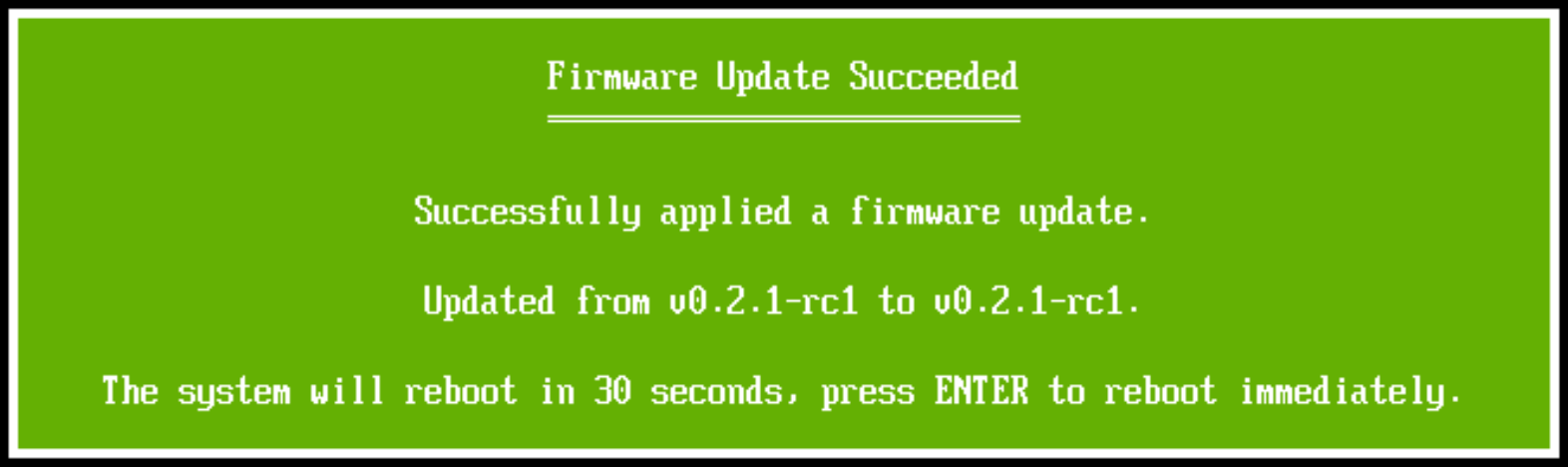
Adding an informational dialog at the end of an update is useful to provide more details on failures or to at least acknowledge that the firmware was trying to process capsules. The dialog also helps to avoid wondering whether the system rebooted itself in the middle of the update process or after its completion. On success, it stays on the screen for 30 seconds before rebooting, while on failure, it waits for a key press (this may actually make a difference for unattended updates, so this could be adjusted).
Here is what success looks like when updating QEMU to the same version of the firmware:
And this is a simulated failure:
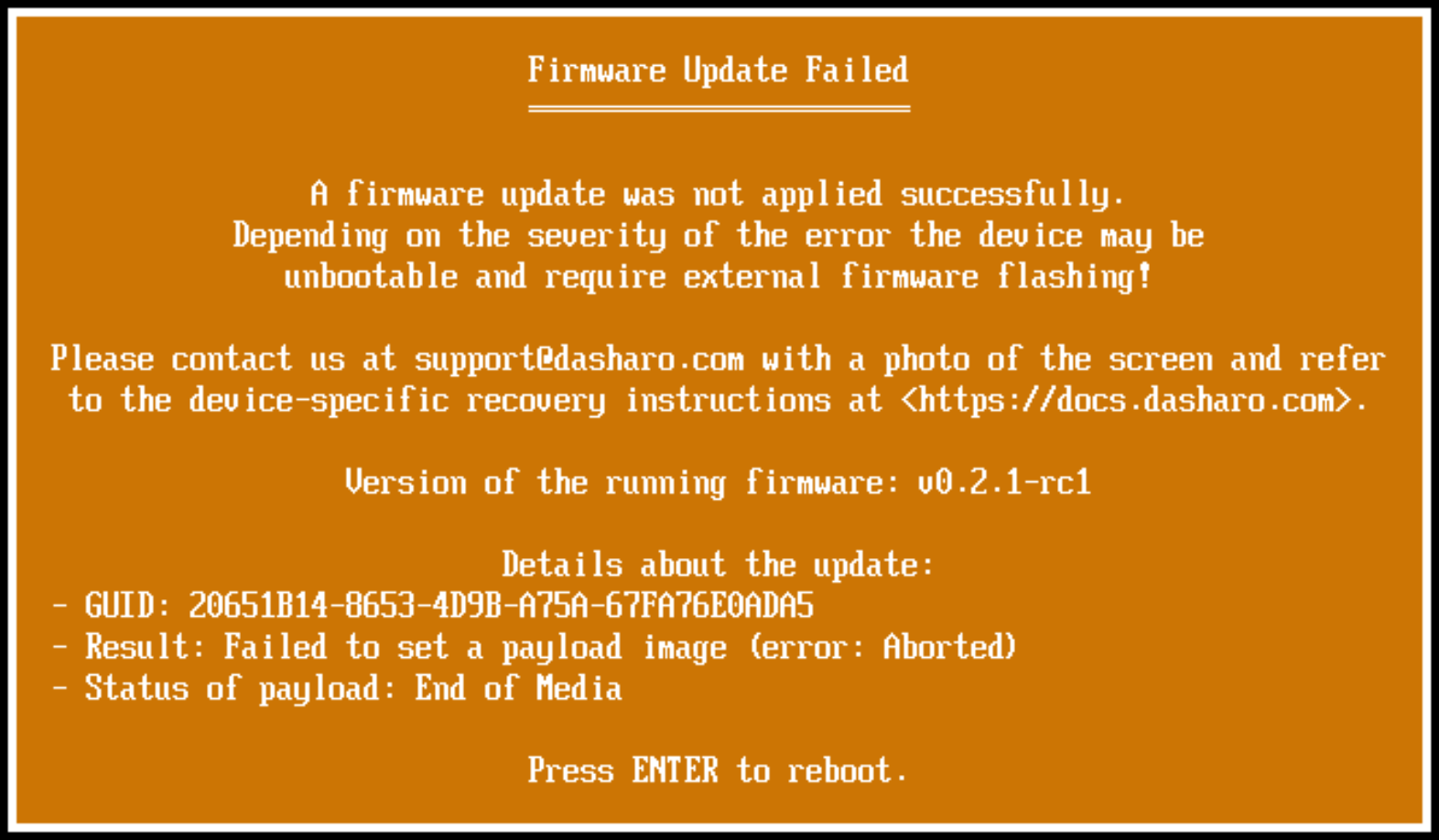
Details about the failure are far from being exhaustive, but it does make tracking down errors easier and can be further improved to capture more diagnostic information.
Pausing ME for the update
One caveat when using capsule updates on Intel platforms is that the state of Intel Management Engine (ME) may need to be adjusted to permit a capsule update. This is because Intel ME uses the flash chip independently of the CPU, and writing to the chip concurrently can confuse ME enough to make the system unbootable.
In other words, ME needs to be disabled to be updated by the host (i.e., program running on the CPU). Of course, there is a way to do it automatically and temporarily. However, it involves losing RAM’s contents, which is a problem when capsules are stored in RAM between reboots. There are two strategies of addressing this:
- Update ME without overwriting its portion of the flash. This involves asking ME to update itself using a binary provided by Intel. Unfortunately, this approach hasn’t worked in experiments conducted so far, but there should be a way to fix it.
- Don’t store capsules in RAM between reboots. Loading them from a disk is
part of the UEFI specification, supported by
fwupdout of the box, and is the route taken not to require managing ME state manually.
Upstream EDK II has the code for handling disk capsules, yet it never actually looks for them, and the only way it knows how to process them is loading into RAM and rebooting… This isn’t helpful when trying to avoid using RAM as a storage, and had to be changed. The updated implementation avoids rebooting and processes capsules during the same boot they are discovered in.
Showing vendor’s logo during updates
Initial implementation had a rather minimalistic look without any graphics. It was motivated primarily by considerations on handling of HiDPI displays. While text can be drawn with a scaling factor, doing the same with images is generally harder. This has been addressed by implementing 2D Lanczos-3 scaling to upscale an image while maintaining a decent quality.
Importing a high-quality and battle-tested implementation would have been better, but, quite surprisingly, it was nowhere to be found in a form suitable for embedding into firmware. The implementation is fast enough to perform all computations without introducing any noticeable delays (a 3840x2160 bitmap has 8,294,400 pixels taking up almost 32 MiB of memory; naively computing convolution on such an image isn’t fast even on a powerful CPU) and dynamically produces a result suitable for the connected display.
Old look:

New look:
Faster post-update boot
The first boot after a firmware update typically takes longer as the new firmware trains RAM from scratch. Subsequent runs are faster because results of the training are stored for future use. Depending on the update method, the cached results can be retained, but capsules weren’t doing it. Now capsules move the cache from the old firmware to the new one. This change applies to all future capsule updates (V1 or V2).
Recovery
The first take on capsules bailed upon hitting an I/O error under the assumption that an internal programmer doesn’t have intermittent I/O issues. While that is a reasonable assumption, it’s not the only possible cause of a failure. As an example, a failure to lift protection from firmware can also stop an update process. Luckily, that kind of failure can often be recovered from by restoring the updated part of the flash to its previous state. If something really weird has happened, the recovery may not help. Still, because attempting it may avoid bricking a device, V2 capsules do their best to restore the original state of the firmware before giving up.
Better progress bar
Last but not least, progress bar improvements. Progress bar now gets updated at a more uniform pace without getting stuck for long at one place or making huge jumps (well, unless a recovery is ongoing; it can’t move progress backward as the fairly limited implementation prohibits that). Definitely not a deal breaker, but a nice thing to have when evaluating how things are going and an excuse to juxtapose old and new update experiences (shown in real time).
Old update process:
New update process:
Availability and next steps
The implementation is in place and works, even though unreleased as of the time of this publication. The new features will be enabled as boards get major updates, which means that not every new release will have them. Decisions of hardware vendors further affect when it happens.
The next priority is upstreaming the changes. TianoCore is, unfortunately, not a very active upstream, at least when it comes to accepting third-party contributions. Even trivial PRs with bug fixes are likely to be closed by a bot due to inactivity before anyone takes a look. For this reason, as a first step, only improved authentication has been submitted not to overwhelm upstream. Not much activity there for five months, but it doesn’t mean these changes won’t land eventually; it can take many more months though. For the sake of making the rest of the new changes easier to find, they too will be submitted, not waiting for the merging of the authentication improvements.
As “V1” and “V2” labels used above suggest, this won’t be the last iteration targeting UEFI capsules. Avoiding any spoilers, expect a similar set of improvements, making submission and interaction with capsules a more pleasant experience while simultaneously hardening their security.
Independent work in upstream
After 3mdeb has implemented UEFI capsules for coreboot with EDK II, it has seen adoption by other parties that contributed some of their changes upstream. Let’s take a look.
Capsules are built out of a firmware ROM image that includes both coreboot and
EDK II as a payload. The approach taken by Dasharo has been to use capsule.sh
script to perform this and related tasks. Since then, an upstream
got a change that integrates capsule building into coreboot’s
build system. An optional behavior there attaches payload data to the
coreboot.rom, specifying which FMAP regions a capsule should flash. Most of
that lives in EDK II, but it hasn’t been upstreamed (this PR
also contains recovery code and merging of graphical and text progress bars;
similar to Dasharo).
Another change in coreboot is enabling handling of disk capsules. The coreboot side has little to do with this other than communicating a request for capsule processing to EDK II and slightly adjusting its behavior around RAM capsules. The implementation extended recently introduced utilities for communicating boot mode to a payload. The EDK II is where more changes are needed, and they can be found in this fork (this and earlier commits; none of which seem to be attributed to 3mdeb/Dasharo despite being a derived work, just compare with our changes to the same file).
A smaller and not yet merged change seeks to support a case where flashing isn’t done via SMMSTORE exposed by coreboot, but everything is handled on the EDK II side.
These are the most prominent changes. A few smaller ones can be found on coreboot’s Gerrit and mainly adjust the behavior of the changes mentioned above.
Credits
As maintainers of most open-source projects can attest, third-party contributions aren’t that numerous. This is even more true when it comes to non-trivial contributions like improving capsule signing in EDK II. Huge thanks to Gustavo dos Santos Cardoso for coming up with the idea of embedding one capsule into another to address security concerns about its format.
Bernhard Fröhlich (a.k.a. decke) from FreeBSD has continued our
previous work, completed and imported the port of fwupd into FreeBSD. This
was great, as it’s much better when there is interest from upstream and
competent users of the target environment.
The post wouldn’t be complete without mentioning that the NLnet Foundation sponsored this project among many others and thereby supported development of open-source firmware.

If you are looking to extend firmware with the features you need, similar to
how it was done in this case, schedule a call or drop an email at
contact<at>3mdeb<dot>com to discuss how 3mdeb can assist with that.
If you’re looking for hardware that fully supports Dasharo and lets you make the most of these firmware features, check out our Dasharo Supported hardware — carefully selected systems that ensure compatibility, openness, and enhanced security.
If topics like secure boot chains, roots of trust, and owner-controlled firmware resonate with you, join us at the Boot Security Mastery Conference.
A five-day event on September 21-25, 2026 in Gdańsk, Poland, combining three days of hands-on training with two days of technical talks, research presentations, and community networking focused on the full boot chain across x86, ARM, POWER, and RISC-V.
