

Introduction
On 22nd October 2026 TianoCore published security advisory
GHSA-99cj-7hg9-mp4m (CVE-2026-97631, CVSS 4.0 score 9.5). It
describes a pre-boot remote code execution vulnerability in the EDK II PXE Base
Code driver, NetworkPkg/UefiPxeBcDxe. Since EDK II is the
reference implementation that most UEFI firmware is built on, the advisory
quickly reached the news.
Many of you asked us whether Dasharo is affected. Thank you for asking: your attention to the security of the firmware you run is what makes Dasharo better, and we value it.
Our answer: current Dasharo releases are not affected, because they do not include the EDK II network stack at all. By current releases we mean the latest Dasharo (coreboot+UEFI) release of each platform listed on docs.dasharo.com. You do not have to take our word for it. Below we explain why and show how to confirm it yourself.
We verified this against the releases listed on 2nd November 2026. On that date CVE-2026-97631 was not listed in the CISA Known Exploited Vulnerabilities catalog (catalog version 2026.10.30).
The vulnerability
The ICMP error handlers in the PXE driver,
PxeBcIcmpErrorDpcHandle and
PxeBcIcmp6ErrorDpcHandle, copy ICMP error messages into a
fixed-size buffer without bounding the copy correctly. According to the
advisory, an attacker who can send a crafted ICMP error message to a
machine while it is PXE-booting can corrupt the driver’s data. With knowledge
of the firmware build, the attacker can also execute code in DXE, before any
operating system security control exists.
The precondition is important: the vulnerable code runs only when the firmware’s own EDK II PXE driver is present and in use.
Why current Dasharo releases are not affected
We use the ASRock SPC741D8 Dasharo v0.9.1 release as the
example, a server platform. It is built from coreboot tag
asrock_spc741d8_v0.9.1.
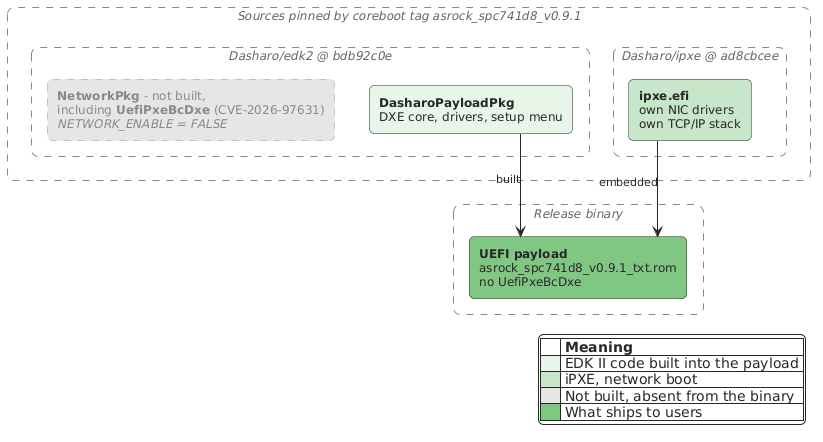
The EDK II network stack is not built
- coreboot builds the
DasharoPayloadPkgUEFI payload from Dasharo/edk2bdb92c0e. - That payload sets
NETWORK_ENABLE = FALSE. - Every NetworkPkg driver depends on that switch. The payload includes the
NetworkPkg lists in both the build description and the
flash image description. Both lists are wrapped in
!if $(NETWORK_ENABLE) == TRUE(build, flash image). That covers SNP, MNP, IP4/6, UDP, DHCP, TCP and the vulnerableUefiPxeBcDxe. - The board configuration does not turn it back on. The only way to pass
extra flags to the EDK II build is
CONFIG_EDK2_CUSTOM_BUILD_PARAMS. For this board it sets only two TCG event log sizes.
Network boot comes from iPXE
The board configuration enables iPXE with
CONFIG_EDK2_ENABLE_IPXE=y. coreboot builds it from
Dasharo/ipxe ad8cbcee and the payload embeds it as a single
file, ipxe.efi, GUID
B68653C7-EEA1-4435-A199-A44F59E4476C.
iPXE implements its own IPv4, IPv6, ICMPv4, ICMPv6, UDP and TCP. It does not contain any EDK II network code.
Releases from 2022
Some Dasharo releases published in 2022 did build the EDK II network stack,
UefiPxeBcDxe included, and its code in those releases is the vulnerable
one. We found no way to reach it in normal use: the driver runs only during
a UEFI PXE boot, and those releases lack the driver that connects the EDK II
network stack to the network controller, so no UEFI PXE boot option is
created. We have not tested an add-in network card whose own firmware
provides that connection. Those releases are around four years old, so treat
them as affected and update to a current release. DSB-003 lists
the affected releases and the first fixed release for each platform. The
GUID check below works on any release, so you can also test the one you run.
Check it yourself
The test that decides is the driver’s file GUID. UefiPxeBcDxe has declared
the same GUID in its source since it was added to edk2 in
2010, so it does not depend on the edk2 revision. To show
that the test works and that the release was not built some other way, we
compare the release with builds made from the same source:
- the release payload is exactly what its coreboot tag builds
- the same build with the EDK II network stack switched on contains
UefiPxeBcDxeunder that GUID - the release payload contains no file with that GUID
You need git, Docker, the release binary and the Dasharo SDK container.
The container ships cbfstool and
uefiextract from UEFITool. To keep the
commands short, define an alias that runs a tool from the SDK on the current
directory:
|
|
Step 1: take the payload from the release
The example uses the ASRock SPC741D8 v0.9.1 release binary
asrock_spc741d8_v0.9.1_txt.rom. Check that its SHA-256 hash matches the one
published for the release, then extract the UEFI payload as it is
stored in the image:
|
|
Step 2: rebuild the payload from the release tag
Build the release tag with the build script it ships:
|
|
|
|
The hashes match. The UEFI payload in the release is exactly what this source produces. The rest of the image differs, because the release also contains Intel TXT modules and is signed for Boot Guard, but neither is part of the payload.
Step 3: build the vulnerable driver on purpose
Now switch the EDK II network stack on, build again and keep the result as a reference:
|
|
List the files in its payload and find the driver:
|
|
uefiextractwarns that it found no volume top file. That is expected: the payload is not a complete flash image.
1parse: not a single Volume Top File is found, the image may be corrupted
The file GUID is the one declared in the driver’s source. The same search finds the driver whenever it is built in.
Step 4: look for it in the release
|
|
The search prints nothing. The release payload contains no file with the driver’s GUID.
Finally, compare the lists of files in both payloads. comm -23 prints files
only in the release, comm -13 files only in the reference build:
|
|
The release has 124 files and the reference build 139. Switching the network
stack on adds exactly these 15 NetworkPkg drivers, UefiPxeBcDxe among them,
and none of them is in the release. The first command prints nothing: no file
is listed only in the release.
Optional: compare the driver’s code
The reference build also lets you hash the driver’s code:
|
|
The second command prints nothing which means that no file in the release has this code, under any name or GUID. This hash identifies the driver only as built from this revision of edk2 with this toolchain. Any other edk2 revision, and so any other Dasharo release may produce a different hash. A missing hash proves nothing about another release, so use the GUID check above to test the release you run.
Do not grep for strings
You may be tempted to search the payload for the driver’s display name:
|
|
This does find a match, but not the EDK II driver: the string is part of iPXE. At startup, iPXE unloads a few known-problematic firmware drivers, and one entry in that list matches VMware’s build of the PXE Base Code driver by name. Check by GUID, as shown above.
Summary
CVE-2026-97631 is a serious vulnerability, but it lives in a component that current Dasharo releases do not build. Network boot in Dasharo goes through iPXE, which has its own network stack. More importantly, this is something you can verify yourself, on the binary you run. That is what open-source firmware should make possible.
Unlock the full potential of your hardware and secure your firmware with the
experts at 3mdeb! If you’re looking to boost your product’s performance and
protect it from potential security threats, our team is here to help.
Schedule a call with
us
or drop us an email at contact<at>3mdeb<dot>com to start unlocking the
hidden benefits of your hardware. And if you want to stay up-to-date on all
things firmware security and optimization, be sure to sign up for our
newsletter:
